Mousing Made Easy

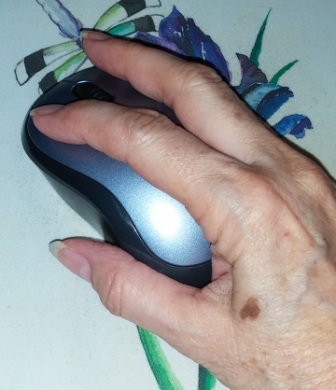
Mousing Tips 2Does my hand look like it’s ready for mousing?  Resting your wrist directly on the desk or mouse pad can aggravate and even cause carpal tunnel syndrome, so using the side of my hand to stabilize my mouse works for me. I’ve been playing with computers since before the mouse was available and I’ve never had carpal tunnel.

There are many other tricks to using a mouse whether it be with a PC or a Mac. Here are just a few:

  • Double clicks are pretty familiar for opening programs and documents and you can also use a double-click to select a single word in a text document.
  • Triple click will select a whole paragraph in a text document.
  • Right-Click – Right-clicking yields a pop-up menu with options for what you’re pointing at. To right-click on a Mac just hold down the Control key when you click.
  • Right-Drag – In Windows dragging with the right mouse button will give you choices like copy or move an object, or create a shortcut. In Word right dragging will give an option menu to create a hyperlink as well as moving or copying.

Scroll Wheel Tricks

  • Ctrl+Scroll – zoom in or out on the Internet and some newer applications
  • Middle Click – pressing down on the scroll wheel, called a middle click, will have various functions according to the program:
    • It could drag your screen around to expose hidden areas if you’ve zoomed in too far,
    • Or it may put you in hyper-speed as you move the mouse up and down.
    • Middle clicking on a link in a browser will force it to open in a new tab so you don’t lose the starting page.
Watch Out for Password Gotchas

Weak passwords are often a factor in the theft of user data. It is also true that it is becoming harder to create secure passwords. No longer can we simply add a few numbers to the end of our old passwords. Even using symbols to replace letters, like @ for a, or 3 for e, isn’t as effective as it used to be because hackers have figured that out, too. More and more it seems that random character generation is the answer.

Programs that store and protect our passwords usually provide random character generators and have the added value of not taxing our memory. Yet, are they any safer than the single password used to open your list? Biometric password protection is on the horizon, but not yet here for the average computer user. So what are we to do?

For me the answer is still long, complicated passwords that are easy to remember, and a password system that doesn’t required writing them down. (See “Creating a Secure Password That’s Easy to Remember”) Today I’m updating that article with a few new rules for creating passwords.

  1. Create long passwords; as long as a site’s rules will allow if they are limited.
  2. Avoid beginning passwords with a capital letter, because that is the most common way to begin a password. Try starting with a number, small letter or a symbol.
  3. Avoid ending passwords with a string of numbers. It won’t fool the hackers.
  4. To give the appearance of randomness try strings of initials such as the first letter of each word in a sentence, title or quote that you can easily remember.
  5. Find ways to use symbols and numbers creatively.

Here are a few examples for creating passwords using a combination of rules:

“The Lakewood Center for Orthopedics and Sports Medicine gets too much of my money,” becomes tLC4O&SMg2momm.

“A Funny Thing Happened on the Way to the Forum starring Zero Mostel is my favorite comedy,” becomes (with a smiley representing the word Funny) – a:-)THotW2tFsZMimfc.

“My day begins at six with a shower and breakfast so I won’t be late to work,” becomes mdb@6waS&BsIwbl82w

Get creative. You Can Do It!


Dyslexie: A Computer Font for People with Dyslexia…and Older Eyes, Too

I never thought of myself as having dyslexia, but when I read an article on Dyslexie, a font created for dyslexics, I began to wonder if perhaps I had acquired it in my many years on the planet. For instance, I was once an avid reader, but now I can hardly finish a book – largely due to failing eyesight.

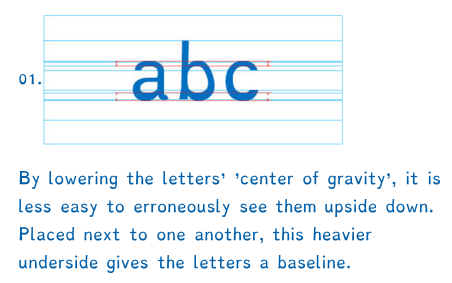
Heavier BaselineThe beauty of Dyslexie is that the letters are much more differentiated than standard fonts and punctuation is more pronounced, making it easier to distinguish each letter and less likely to confuse an 8 with a B, or a capital O with a zero for instance. In my years of reading serial numbers and program installation codes those were two of my nemeses.

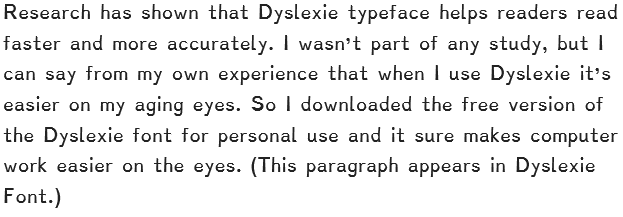
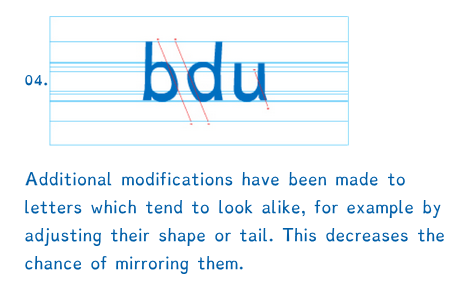
Slant for mirrorIf you have dealt with dyslexia you know that dyslexics tend to see letters in mirror image or upside down. The Dyslexie typeface improves letter recognition by making parts of letters longer, or wider or slanted a little differently so that they are less easily confused. I borrowed the two examples above from DyslexieFont.com to illustrate.Research has shown


Finding Elusive Files

Even techies misplace computer files from time to time. I have to admit it happens to me. Luckily I have tools that make finding those elusive files easy — most of the time. Windows 7 and earlier provided a Search box when you press the Start button. In Windows 8 & 8.1 you simply start typing your request from the Start screen. Windows 10 had voice activated search via Cortana and Speech Recognition to listen to your verbal commands. With Windows 11 it’s back to using search boxes. (Make up your mind Microsoft ;^)

When you search for files via Windows File Explorer (Home in Windows 11) advanced options become available in the ribbon menu. For instance you can select a date range, limit the locations to be searched, select the file types, or perhaps most often useful: search for words or phrases within documents. There are so many choices. Just take a look at an active Search Tools ribbon:

Advanced Search Options

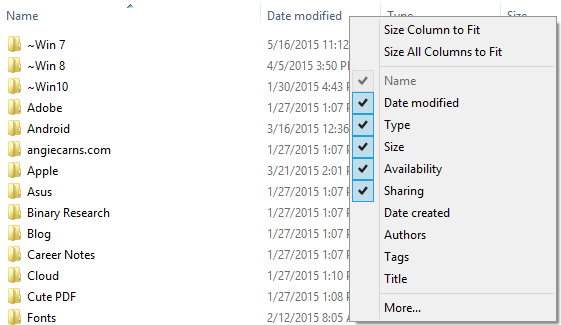
In my last post, Finding Recent Files, I mentioned using Detail View to sort by date. Clicking the headers in Detail View will sort any of the columns. To help your search you can call up more columns by right-clicking on the header row to get a list of available columns.

DetailViewHeaders2

While you’re searching for those files, don’t forget to check the Downloads folder if you were opening email attachments or pulling files from the Web.

You can do more than you may have realized!

Prevent Computer Overheating

Hot ComputerIn my years as a tech I’ve often opened a sick computer to find it full of dust bunnies.  Overheating is a big problem for the sensitive parts of your computer. That’s why computers have fans and air vents to continually circulate the hot air out and bring in cooler room air. When we keep our computers on the floor under our desks we sometimes forget to check for the dust accumulation and blocked air vents that can be a major cause of overheating.

For a cooler running computer keep it in a low dust zone with plenty of good airflow. If it’s in a cabinet, be sure there’s good venting and consider propping the door open at least a half-inch. If you have pets, you may need to check periodically for pet hair on those air vents, especially around the intake for the cooling fan. It’s best to keep a laptop on lap desk and not directly in your lap because your clothing can be sucked up against the air vents. Similarly it’s best to keep a desktop on the desk or a stand to keep it off the floor and especially off the carpet.

Other causes of overheating include worn out or defective cooling fans, usually recognized by their excessive or uneven noise. Sometimes adding extra equipment can cause the cooling system to work overtime. And of course the surrounding temperature is a factor. My introduction to computers was in the late 50’s when Dad proudly showed us the office’s new payroll computer. It took up a room the size of a large master bedroom and was kept a chilling 60 degrees Fahrenheit. Luckily modern desktops and laptops run well in comfortable temperatures.

It never hurts to clean your computer on a regular basis. Canned air is the cheapest way to blow out that dust. Wear a mask to protect yourself. Blow the air across the components, not into them, and use short bursts of air to keep the can from freezing your hand. If you need more frequent cleanings you can buy a much neater alternative, a small electronics vacuum cleaner for about the same cost as a dozen cans of air.

You Can Do It!

Cloud Computing in a Nut Shell

Cloud in a NutshellCloud computing consists mainly of hardware and software resources made available on the Internet. For businesses these services typically provide access to advanced software applications and high-end networks of server computers. Individuals are more likely to be interested in cloud storage and backup, although there are some software packages available for us, too, like Google’s Docs, Sheets and Slides that come free with your free Google Drive and Gmail account. A good place to learn about how to work with Google Drive and Docs (as well as Microsoft OneDrive with Online Apps) and much more is GCFLearnFree.org.

Another popular use of the cloud is file sharing, such as pictures you might share on Facebook, or documents, like the ones I share with my students via my OneDrive. (a.k.a. Angie’s Cloud on my home page.) Technically your email is a cloud application provided by a host company represented by whatever comes after the @.

You may already be using the cloud. For instance if you have an Amazon Kindle or a Barnes & Noble Nook, your books are stored the cloud. These companies store the books you purchase on their servers and when you “buy” a book you are granted access to it. In like manner, you download iTunes, once again you are using the cloud. So you’re probably more savvy than you realized.

Cloud storage and online backup are sometimes viewed as one in the same. However, cloud storage is keeping files online to be accessed via the internet, while online backup is keeping your files on your local hard drive with copies in the cloud. The two services are often combined. A good article on cloud storage that includes both free and fee-based options and is always up to date can be found on PC Magazine’s website. If you’re using or considering cloud storage and backup be sure to read Protect Yourself from Ransomeware for some hints on safety.

As always, You Can Do It!

Protect Yourself from Ransomware

In the last two months I’ve learned of three friends who were the victims of various forms of ransomware. The object of ransomware is to block access to your computer’s data and/or operating system until you pay a ransom to the crooks. Two of my friends weren’t sure how they’d gotten hacked, but suspected that it was something they clicked on while surfing the Internet or in an email, which is the most common way of contacting this Trojan Horse type of virus. Even more devastating is that the newer strains of ransomware will encrypt your cloud files (Dropbox, OneDrive, etc.) and even your backup files if they’re accessible.

The third victim received a phone call from someone purporting to be connected with Microsoft who told her that her Windows license was out-of-date and her computer was in bad shape. He offered to fix it if she would go to a web site and click on a link that would allow him remote access to her computer. This scam artist was very convincing and tried to get her credit card information by presenting her with an official looking invoice. When she hesitated he put a password on her computer so that she could not get to her desktop or any of her files. Although this was as much scam as ransomware, the effect was the same. If she had given her credit card information it is doubtful whether her computer would have been restored to her and all too likely that she would have found unauthorized charges on her card. Be aware that no reputable company will cold call you to repair your computer.

Other than disconnecting from the Internet it may seem that we cannot protect ourselves, but take heart. There are steps we can take to avoid or block these attacks and to prepare to recover if we should fall victim to ransomware.

  1. Install and keep up-to-date a good Internet security program. Four programs that are consistently top-rated are Norton, McAfee, Bitdefender and Kaspersky. (Note: Some of the larger Internet hosts, such as Comcast and ATT, are offering free protection downloads to their customers.)
  2. Keep good backups that are not directly connected to your computer. In other words, if you backup to an external hard drive, disconnect it when the backup is complete. It would be a good idea to have at least two drives and switch them out after every backup. Better yet, consider an encrypted backup service such as Malwarebytes, Carbonite or Mozy.
  3. Consider ransomware blocking software such as CryptoPrevent by Foolish IT. (At this writing other blockers are few and designed for professional networks.)
  4. Be suspicious! If a link or an email doesn’t feel right you can double-check the source by hovering your mouse pointer over the link or email address and watching for a pop-up or an indicator in the lower left corner of your screen that will show you the real web or email address of that link. (Example: Hover over this link to look for the address https://www.timeanddate.com/, a great site for keeping track of time changes and what’s going on in the sky.)

Be vigilant and stay safe. You can do it!

Pop-up Menus the Right-Click Way

Did you know that right-clicking gives you a pop-up menu with options for what you’re pointing to or have selected? It’s almost like having built-in help tips because these pop-ups are sensitive to the program you’re working in as well as the particular object selected. This is such a handy tool that I right click anytime I’m having trouble with a particular object.

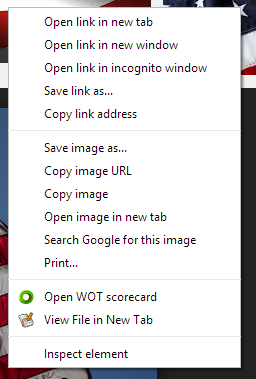
Pop-up MenuAs a for instance try right clicking on the picture of the pop-up menu to your left. Different browsers may give you differently worded options, but those options will have pretty much the same in functions. The pictured menu came from Google Chrome. If your browser is Internet Explorer or Firefox, for instance, your pop-up will be slightly different. Firefox offers a Private window to Chrome’s Incognito window and Internet Explorer offers “Add to favorites…” in place of “Bookmark This Link”.

Applications on your computer may also change the pop-up choices. (Notice the WOT choice. To learn more about the security this app offers check out Getting Clues from “Safe Internet” Applications.)

Right-clicking on images is a great example, however, be aware that text and many other objects offer pop-up helpers. The application or program you are using will also make a big difference. For instance right-clicking on the text in this article will give you a pop-up that’s more concerned with the browser than the text. But if you right-click on text in a word processor you will most likely get a pop-up for formatting or editing the selected text.

Right Clicking on a Mac

To right click on a Mac just hold down the Control key when you click. GCFGlobal has more information on Right-Clicking, including how to change settings and use a trackpad to make pop-ups appear in Section 5 – Common Computer Tasks.

Make Your Browser More Readable

In a world where we don’t all have 20/20 vision or better we sometimes need to adjust our screen in order to see words and pictures more clearly. Many sites now offer options for text size without effecting the size of the images. But since these are not universal, it’s good to know that modern browsers understand this and have created controls to help us adjust the size of what we see. Here are a few tricks that work in all those modern browsers.

  • Type too small? If you’re using the Windows operating system, try holding down your Control (CTRL) key while pressing and releasing your + (plus) key.
  • For a Mac use the Command key with the plus key (+). You can do this as many times as it takes.
  • If the type is too big or you can’t see the whole picture, try holding down your Control (CTRL) key while pressing and releasing the minus key (-).
  • For a Mac use the Command key with the minus key.
  • For a faster response roll your mouse’s scroll wheel back and forth while hold down your Control key.

As always, You can do it!

Getting Clues from “Safe Internet” Applications

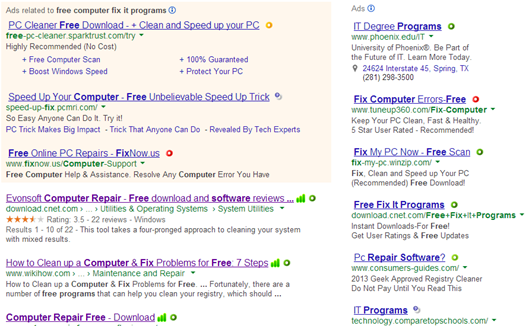
Most modern Internet security suites include indicators to let you know which websites are trustworthy when you are using search engines. It is becoming common to see green, orange or red bars to indicate a site’s rating. You can also download indicator apps such as Web of Trust (WOT) which gives colored markers that show customer reported satisfaction or dissatisfaction to help you decide a site’s trustworthiness. When searching with these apps you’ll see indicators similar to those pictured below:

Safe Internet Indicators